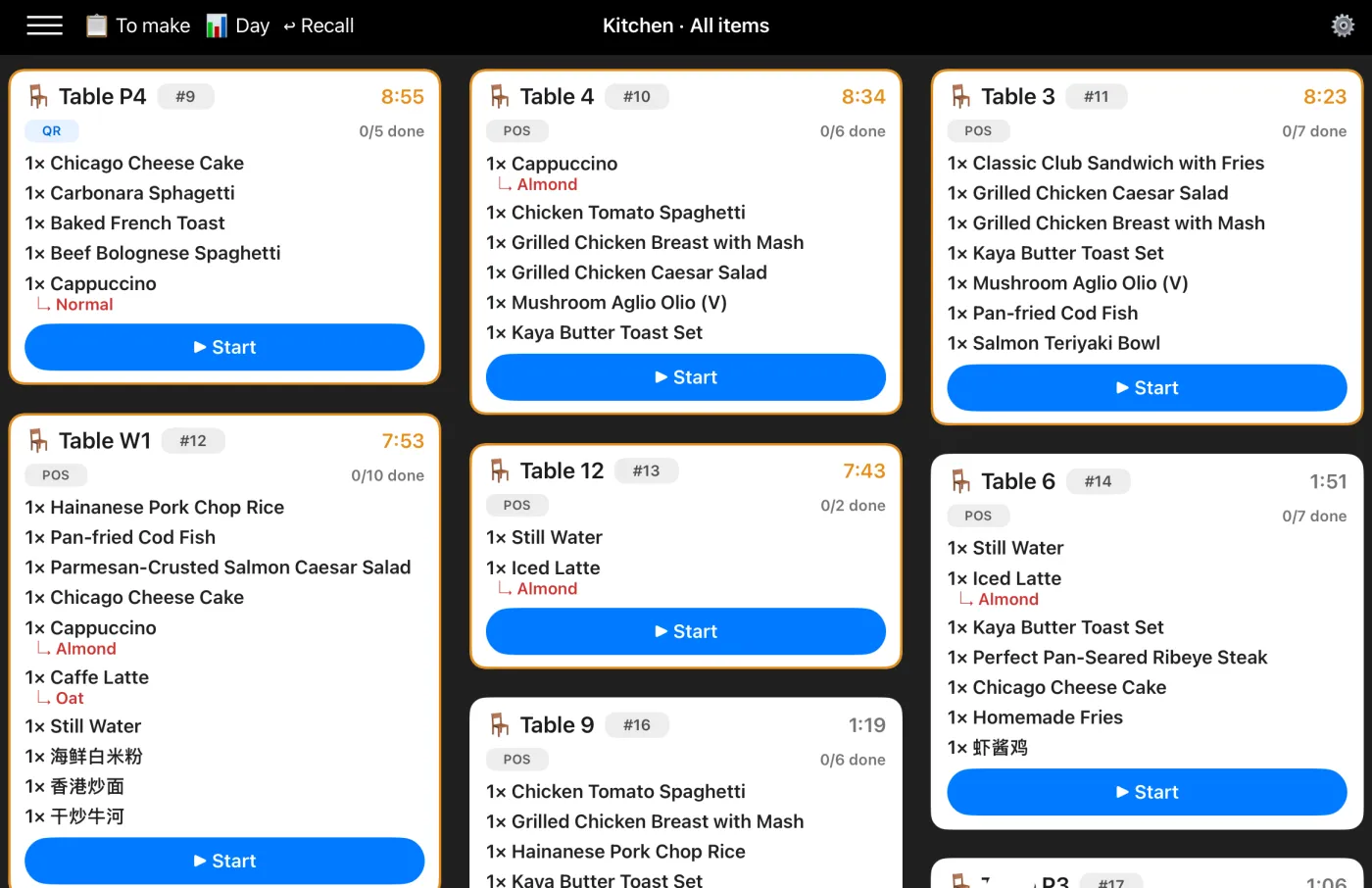
Shopways native iPad Kitchen Display System showing live kitchen tickets

A Native iPad Kitchen Display for Your Café or Restaurant

Keep the kitchen calm and in sync. Orders fire from your iPad POS and QR ordering straight to a native iPad Kitchen Display — with station routing, live timers, one-tap bump & recall, and it keeps working even when the Wi-Fi drops.

How the Kitchen Display Works

The Kitchen Display runs as a native app on an iPad in the kitchen or on the pass. Orders fire to it live from the same Shopways iPad POS your team uses at the counter — and from QR ordering.

1. Order is sent

Staff ring the order on the iPad POS — or a guest orders by QR at the table. It fires to the Kitchen Display the moment it's sent, with a live timer running.

2. Kitchen works the ticket

Cooks see every item and tap them done as they plate. With station routing, each station sees only its own items — coffee at the bar, mains on the line.

3. Bump when it's ready

One tap bumps the finished ticket off the display — and Recall brings it back if it's cleared too early. It keeps working offline, so nothing gets missed if the Wi-Fi wobbles.

Keep the Counter for Selling, the Kitchen on the Display

Trying to ring up the next customer and track what's still being made on one screen is how orders slip. Shopways splits the two — the iPad stays a fast till, and a native iPad Kitchen Display runs the pass.

Real-Time & Live Timers

Orders fire the instant they're sent, each with a timer that ages amber then red, so the pass protects its slowest ticket.

Works Offline

It's a native iPad app — it holds the live board and queues your actions when the Wi-Fi drops, then syncs on reconnect. You can print a chit as a backup too.

Clear Statuses

New In Progress Ready — everyone reads the same display the same way.

Stations, Bump & Recall

Route categories to their station, bump a ticket in one tap when it's ready, and recall the last one if it's cleared too early.

Calmer for the Counter, Clearer for the Kitchen

At the Counter
  • The till stays fast — keep taking orders without tracking the queue.
  • Pair it with a QR menu so customers decide before they reach you.
  • Fewer "is my order ready?" interruptions during a rush.
  • Works alongside cash, card and PayNow checkout.
In Prep & Kitchen
  • See every order's items on a native iPad display, filtered by station.
  • No paper tickets to print, lose, or decipher.
  • Live timers and statuses make handovers obvious between shifts and stations.
  • New staff get up to speed fast — the display is self-explanatory.

Mistakes Happen — Void an Order Cleanly

A wrong order, a cancellation, or a no-show? Take it off the display with a proper void — not a silent delete that quietly throws your numbers off.

What a void does
  • Drops the order off the live display so the kitchen stops working on it.
  • Restores stock automatically — voided items go back into your counts.
  • Reverses any loyalty stamp that was awarded, so regulars aren't over-credited.
  • For a dine-in table, voids the whole table together — every linked ticket, not just one.
Why it matters
  • Honest records — every void is logged as an audit trail, not erased, so your sales reports stay trustworthy.
  • Accurate stock — cancellations feed back into inventory, so counts don't drift.
  • Fair loyalty — a cancelled sale shouldn't earn a stamp; the reversal keeps rewards honest.
  • A clean board — only real, live orders stay on screen, so staff aren't chasing ghosts.

The Kitchen Display Is Included — No Per-Screen Fee

The Kitchen Display isn't a separate product or a per-screen add-on. It's part of the same Shopways iPad POS that runs your QR menu, stamp rewards and QR payments.

iPad POS Kitchen Display (KDS) QR Menu QR Payments Stamp Rewards
Get Started with Shopways

New to Shopways? See how it compares as an iPad POS, or why simple systems win for small F&B.

Kitchen Display – FAQ

It's a native iPad app, included with your Shopways iPad POS — run it on an iPad in the kitchen or on the pass. No separate KDS hardware, and no per-screen fee.

Yes. When an order is sent on the iPad POS — or placed by a guest via QR — it fires to the Kitchen Display in real time, with a live timer, so the kitchen always sees the current queue.

Yes. Because the Kitchen Display is a native iPad app, it keeps working offline — it holds the live board and queues your actions (start, bump, item-done), then syncs when the connection returns. You can also print a kitchen chit as a backup.

Especially so. Shopways is built for small F&B that want a simple setup that actually gets used — one iPad at the counter, one on the pass, no heavy restaurant system.

Void it. A void takes the order off the live display and does the clean-up automatically — restores stock, reverses any loyalty stamp that was awarded, and (for a dine-in table) voids every linked ticket together. It's logged as an audit trail rather than silently deleted, so your sales, stock and reports stay accurate.

Explore more: iPad POS · Stamp Rewards · Blog